Skip to content
PDF Tools Japan

JPEG vs JPG: What’s the Difference? – And When to Use PNG

A form asks for a “JPEG file”, but your image ends in “.jpg”. Will it work? Yes: JPEG and JPG are exactly the same format. This guide explains why there are two extensions, how JPG compares with PNG, HEIC and WebP, and which format to choose when you turn a PDF into images.

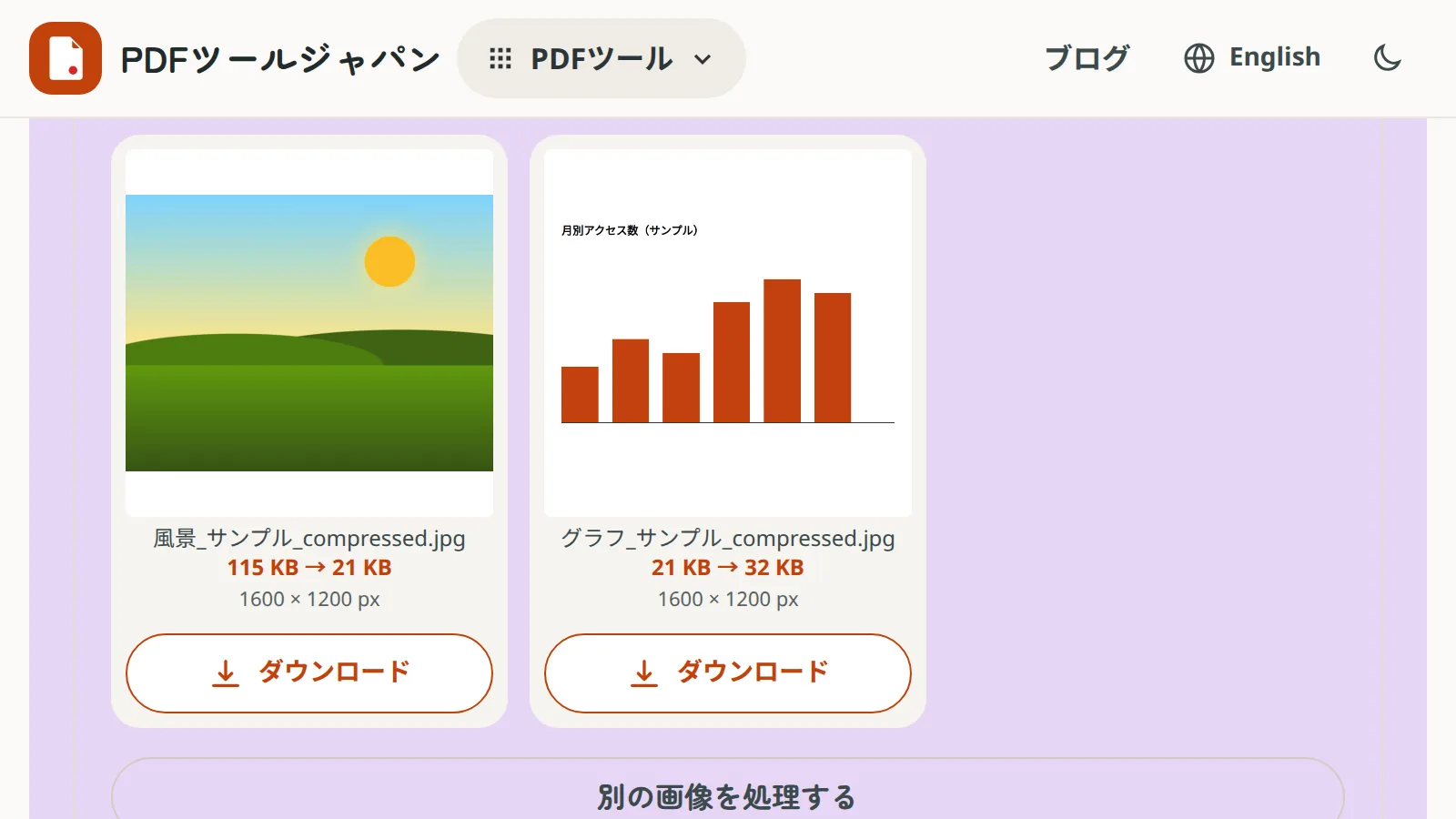
Use PDF to JPGFree, no sign-up. Your files stay on your device.Screenshot: Compress Images converting a sample landscape PNG and a chart PNG to JPG; the photo shrinks from 115 KB to 21 KB while the chart grows from 21 KB to 32 KB

JPEG and JPG are the same format

JPEG is the most common format for photos. The name comes from the committee that created it, the Joint Photographic Experts Group.

“.jpg” and “.jpeg” are two extensions for the same JPEG file. There is no difference in quality or size. You may also see “.jpe” or “.jfif”; those are JPEG too.

Why there are two extensions

Old versions of Windows (MS-DOS) only allowed three-letter file extensions, so “.jpeg” was shortened to “.jpg”. The habit stuck. Macs and phones sometimes use “.jpeg”; it just depends on the device or app.

A form asks for JPEG: is .jpg OK?

Yes. Whether a form says “JPEG” or “JPG”, both .jpg and .jpeg files are the same thing.

Occasionally a badly built upload form checks only the letters of the extension and rejects “.jpeg”. In that case, rename the file’s ending from “.jpeg” to “.jpg” (or the other way round); no conversion is needed.

Renaming only works between JPEG extensions. Renaming a PNG or HEIC file to “.jpg” doesn’t change what’s inside, so it won’t open or will cause errors. Convert those properly with a conversion tool.

JPG, PNG, HEIC and WebP compared

Here is how the common image formats compare.

Common image formats
FormatBest forQualityTransparent backgroundWhere it works
JPG (JPEG)Photos, colourful flyersLoses a little quality each save (lossy)NoAlmost every device and form
PNGText, diagrams, charts, screenshots, logosNo quality loss (lossless)YesAlmost every device and form
HEICPhotos taken on an iPhoneHigh quality in smaller files than JPG—Often won’t open on Windows or in upload forms
WebPImages on websitesSimilar quality to JPG in smaller filesYesNot supported by some older software and forms

JPG or PNG?

Photos: JPG

JPG is good at shrinking images with smooth colour changes, like photos. ID photos, phone pictures and photo-heavy flyers suit JPG.

Text and diagrams: PNG

JPG tends to add fuzzy noise around sharp edges such as letters. Text-heavy documents, tables, charts and screenshots stay crisp as PNG. Use PNG too when you need a transparent background, such as a logo or a hanko stamp image.

If the form specifies a format, follow it

If an application site asks for JPEG, submit a JPG even for text-heavy images. Choose a higher quality setting so the text doesn’t blur.

Which format when turning a PDF into images?

The same rules apply to PDFs.

Choosing a format for PDF pages
PDF content / useRecommendedTool
Photo-heavy flyers and brochuresJPGPDF to JPG
Sending on LINE or social media, viewing on a phoneJPG (smaller files)PDF to JPG
Text-heavy documents, tables, drawingsPNG (crisp text)PDF to PNG
Charts or diagrams for slidesPNGPDF to PNG
Submissions that must be JPEGJPG (quality: High)PDF to JPG

Converting other formats to JPG

  • iPhone photos (HEIC): HEIC to JPG makes JPGs that open on Windows and in upload forms
  • PNG or WebP images: in Compress Images, choose JPG as the output format to convert and shrink at the same time. JPG has no transparency, so transparent areas become white
  • Word or PDF documents: Word to JPG and PDF to JPG turn pages into images

None of these tools upload your files; everything is processed on your device.

Frequently asked questions

Q. Which has better quality, JPEG or JPG?

A. Neither. Only the letters of the extension differ; the file format is identical.

Q. Can I rename .jpeg to .jpg?

A. Yes, it opens just the same. Renaming a PNG or HEIC file to .jpg is not a conversion, though; use a conversion tool for those.

Q. Which is smaller, JPG or PNG?

A. For photos, JPG is much smaller. For simple images with only text or flat colours, PNG can be smaller.

Q. Does saving a JPG again and again lower the quality?

A. Yes, a little each time you edit and re-save. Work in PNG while editing and export a JPG at the end.

Q. Should I convert a PDF to JPG or PNG?

A. JPG for photo-heavy PDFs or sharing on LINE; PNG for text and tables. If the destination asks for JPEG, choose JPG.